Update (2026): This post was written for CentOS 6 (
yum,service). CentOS 6 and 7 are end of life; on a current distribution (e.g. Rocky/AlmaLinux withdnf, or Debian/Ubuntu withapt) installvsftpdand usesystemctl start vsftpd. Plain FTP is unencrypted, so prefer SFTP or FTPS for anything beyond experiments. Theftplibcode below works on Python 3 as is.
Today I will approach the system using a few lines of Python code:
- Python: FTP client
- CentOS: FTP server
Let's get started!
FTP uses two ports: 21 and (sometimes) 20 if the server is in active mode, or a random port in passive mode (we'll see this in this post).
First, install vsftpd and ftp on your server:
yum install -y vsftpd   # FTP server
yum install -y ftp      # FTP client
service vsftpd start
Check whether the FTP service is listening on port 21:

That's the server side. Now on the client, open Python IDLE and run this:
from ftplib import FTP

f = FTP('ip_address_my_ftp_server')
f.login('anonymous', 'anonymous')  # anonymous login
# f.quit()  # omitted on purpose, explained below
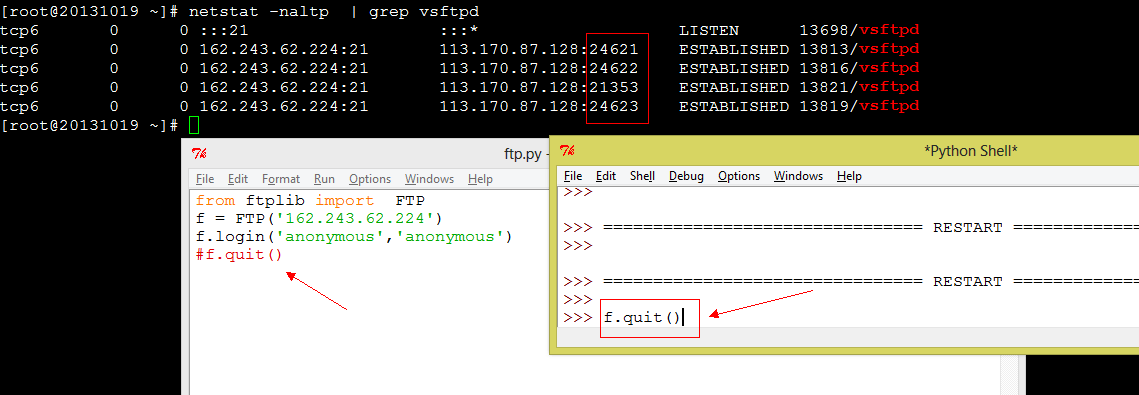
Check netstat again and you will see what is happening:

Here 113.170.87.128:24567 is my computer's IP address and the port number that the FTP server picked at random (passive mode).
Because f.quit() was not executed, the connection is still open, which is why you see ESTABLISHED above. If f.quit() is executed, the connection closes before you can see anything.
Try it as many times as you like. This picture was taken when I used f.quit() to close a connection to the CentOS FTP server:
Have fun. I will write more about this in the next few days; we're just scratching the surface, but it's fun, right?