Update (2026): BackTrack 5 đã ngừng phát triển từ lâu; người kế nhiệm là Kali Linux (cũng có thể dùng Parrot OS). Chỉ nên xem bài này như ghi chép lịch sử.
Cài đặt BackTrack 5 bị treo (màn hình đen) sau khi chạy startx.
I encountered this problem while installing BackTrack 5 R3 from a USB stick (multiboot). I googled it and found some help, but in the end I had to fix it myself.
If you have already tried the following and it did not work:
- Edit the file
/etc/default/grub. - Find the line:
GRUB_CMDLINE_LINUX_DEFAULT="text splash nomodeset vga=791" - Change it to:
GRUB_CMDLINE_LINUX_DEFAULT="quiet splash i915.modeset=1 vga=791" - Save and close the file.
- Run
update-grubto refresh GRUB. - Reboot.
I guess you got stuck at step 5 and could not update GRUB.
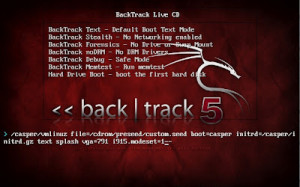
At the boot menu, move the cursor to the top entry (BackTrack Text) and press TAB to edit it. A command line appears; replace
text splash nomodeset vga=791with
quiet splash i915.modeset=1 vga=791Press ENTER and you are all set.
Just remember: after the installation finishes, edit /etc/default/grub, run update-grub, then startx.
By the way, the default password for root is toor.